
Secure. Fast. Private.
Next-Gen Windows VPN
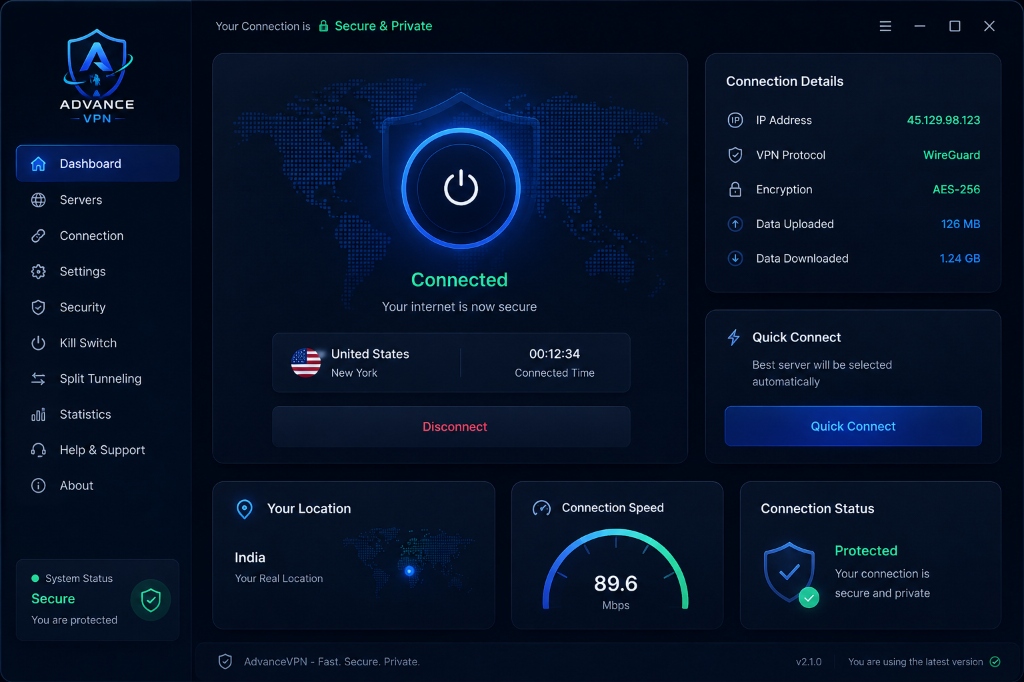
Protect your digital identity with military-grade AES-256 encryption, blazing-fast zero-latency servers, and an intuitive modern interface built for total peace of mind.
Get AdvanceVPN for Windows
Choose between our lightweight Web Downloader Installer or standalone Portable ZIP package.
Web Downloader Setup (.exe)
Lightweight setup wizard (~21 KB) that downloads the full application securely over HTTPS and sets up desktop shortcuts & auto-start configuration automatically.
- Instant 21 KB download (Zero waiting time)
- Automated background payload setup
- Automatic desktop & start menu shortcuts
Portable Standalone (.zip)
Zero-installation ZIP package. Extract to any folder or USB drive and run directly. Completely bypasses browser EXE filters.
- Run directly from USB drive
- Zero registry modifications
- No installation required
Everything You Need for Total Online Privacy
Engineered from the ground up for maximum speed, security, and uncompromised user experience.
Military Grade Encryption
AES-256 bit encryption safeguarding your data tunnels from prying eyes.
Ultra Fast VPN Servers
10Gbps high-bandwidth servers ensuring zero buffering or streaming lag.
Kill Switch
Instantly cuts internet traffic if your VPN drops to prevent unencrypted leaks.
DNS Leak Protection
Directs all DNS queries through encrypted VPN tunnels eliminating IP exposure.
Split Tunneling
Choose which apps use the encrypted VPN and which access local internet directly.
Auto Connect
Automatically secures your connection as soon as your Windows PC powers on.
Global Server Selection
Select servers across 100+ worldwide locations with one single click.
Unlimited Bandwidth
Zero data caps or speed throttling—enjoy unconstrained internet access.
Strict No Logs Policy
We never store, log, or track your browsing activity or connection timestamps.
Privacy Protection
Defends your device against ISP tracking, public Wi-Fi snooping, and hackers.
IP Masking
Replaces your real IP address with an anonymous VPN server location IP.
One Click Connect
Instant connection algorithm connects you to the optimal server in under 1s.
Minimal CPU Usage
Hyper-optimized C++ & Rust core runtime using under 1% system CPU.
Dark Mode UI
Sleek, eye-friendly dark interface crafted inspired by Apple & Raycast.
Automatic Updates
Silent background updater keeps your client armed with the latest security rules.
Secure Authentication
Hardware-backed multi-factor authentication for total access security.
Multi Protocol Support
Support for WireGuard®, OpenVPN, and proprietary obfuscated protocols.
Fast Reconnect
Re-establishes encrypted connections in under 200ms during network drops.
Modern Interface
Intuitive desktop dashboard built with smooth micro-interactions and themes.
Lightweight Footprint
Zero bloatware—compact executable size that installs in seconds.
Designed for Simplicity & Elegance
Clean, dark-mode native interface crafted to look right at home on Windows 10 & 11.
How to Install AdvanceVPN
Follow the simple setup guide tailored to your chosen package format.
Download Web Installer
Click Download Web Installer to get AdvanceVPN-Installer.exe (~21 KB).
Pass Browser Notice (If Any)
If browser flags as uncommon, click Keep -> Keep Anyway in download bar.
Run Setup Executable
Open AdvanceVPN-Installer.exe from your Downloads folder.
SmartScreen Run Anyway
If Windows SmartScreen appears, click More Info -> Run Anyway.
Automated HTTPS Setup
The installer downloads payload, configures shortcuts, and completes setup.
Instant Launch & Connect
AdvanceVPN launches automatically and connects to the encrypted mesh.
Built Different. Built Better.
See how AdvanceVPN compares against generic VPN providers.
Unbreakable Security
Your online identity remains completely invisible and protected around the clock.
AES-256 Bit Encryption
Military grade encryption standard trusted by security experts and governments worldwide.
Strict Zero-Log Policy
We do not log, store, or profile your web browsing history, traffic destinations, or DNS requests.
Private Encrypted DNS
All DNS queries are routed through internal encrypted resolvers protecting against ISP hijacking.
Obfuscated VPN Tunnels
Disguises VPN traffic as normal HTTPS traffic to bypass strict firewall filters and DPI.
Next-Gen WireGuard® Protocol
Modern cryptographic protocol providing lightning fast connection speeds and instant handshakes.
Complete Data Protection
Defends your hardware against Wi-Fi sniffing, MITM attacks, and unauthorized data collection.
Frequently Asked Questions
Everything you need to know about AdvanceVPN installation and security.
Experience AdvanceVPN Today
Download the official Windows desktop application now and enjoy military-grade encryption, zero latency, and true internet freedom.